

1. Pinia基本概念
面试题:Pinia 相比 Vuex 有什么样的优点?为什么现在官方推荐使用 Pinia ?
Pinia,是一个 Vue 阵营的新的状态管理库,现在 Vue 官方已经推荐使用 Pinia 来代替 Vuex,或者你可以把 Pinia 看作是 Vuex 的最新的版本。
- Pinia 的基本介绍
- Pinia 优势
1-1. Pinia 的基本介绍
Pinia 是一个西班牙语的单词,表示“菠萝”的意思。因为菠萝是由一小块一小块组成的,这个和 Pinia 的思想就非常的吻合,在 Pinia 中,每个 Store 仓库都是单独的扁平化的存在的。
Pinia 是由 Vue 官方团队中的一个成员开发的,最早是在 2019 年 11 左右作为一项实验性工作所提出的,当时的目的是将组合 API 融入到 Vuex 中,探索新版本的 Vuex 应有的形态,随着探索的进行,最终发现 Pinia 已经实现了 Vuex5 大部分的提案,因此 Pinia 就作为了最新版本的 Vuex,但是为了尊重作者本人,名字保持不变,仍然叫做 Pinia。
相比 Vuex,Pinia 的 API 更少而且更简单,还支持组合式 API,还可以和 Typescript 一起使用来做类型的推断。
pinia 官网:https://pinia.vuejs.org/
1-2. Pinia 优势
在 Pinia 中,已经不存在 mutations,只有 state、getters、actions
import { defineStore } from 'pinia'

export const useCounterStore = defineStore('counter',{
    state: () => ({
        count: 0
    }),
    getters: {
        doubleCount: state => state.count * 2
    },
    actions: {
        increment() {
            this.count++
        },
    }
})
在上面的代码中,我们创建了一个仓库,该仓库中提供三个选项,分别是 state、getters 以及 actions。
actions 里面支持同步和异步来修改 store,相当于将之前 Vuex 中的 mutation 和 action 合并了
import { defineStore } from 'pinia'

export const useCounterStore = defineStore({
    // ...
    actions: {
        // 同步的修改仓库状态
        increment() {
            this.count++
        },
        decrement() {
            this.count--
        },
        // 异步的修改仓库状态
        async incrementAsync() {
            await new Promise(resolve => setTimeout(resolve, 1000))
            this.increment()
        },
        async decrementAsync() {
        await new Promise(resolve => setTimeout(resolve, 1000))
        this.decrement()
        }
    }
})
可以和 TypeScript 一起使用,以此来获得类型推断的支持
import { defineStore } from 'pinia'

// 这里定义了一个名为 Todo 的接口
interface Todo {
    id: number;
    text: string;
    done: boolean;
}

export const useTodoStore = defineStore({
    id: 'todo',
    state: () => ({
        todos: [] as Todo[],
    }),
    getters: {
        completedTodos: state => state.todos.filter(todo => todo.done),
    },
    actions: {
        // text 指定了是 string 类型
        addTodoItem(text: string) {
            const id = state.todos.length + 1
            const newTodo = { id, text, done: false }
            state.todos.push(newTodo)
        },
        // todo 指定了是 Todo 类型
        toggleTodoItem(todo: Todo) {
            todo.done = !todo.done
        },
        async fetchTodos() {
            const response = await fetch('https://jsonplaceholder.typicode.com/todos')
            const todos = await response.json() as Todo[]
            state.todos = todos
        },
    },
})
关于 Store 仓库,每一个 Store 仓库都是独立的扁平化的存在的,不再像 Vuex 里面是通过 modules 嵌套
支持插件扩展,可以通过插件(函数)来扩展仓库的功能,为仓库添加全局属性或者全局方法
// ...
// 这里定义了一个名为 localStoragePlugin 的插件,本质上就是一个函数
const localStoragePlugin = (context: PiniaPluginContext) => {
    const key = 'my-app-state'

    // 从 localStorage 中恢复状态
    context.state = localStorage.getItem(key) || context.state

    // 监听 state 变化,将变化保存到 localStorage
    context.subscribe((mutation) => {
        localStorage.setItem(key, context.state)
    })
}
// ...

// 创建 Pinia 实例,并注册 localStoragePlugin 插件
const pinia = createPinia()
pinia.use(localStoragePlugin)
更加轻量,压缩之后体积只有 1kb 左右,基本上可以忽略这个库的存在
真题解答
题目:Pinia 相比 Vuex 有什么样的优点?为什么现在官方推荐使用 Pinia ?
参考答案:
Pinia 是由 Vue.js 团队成员开发的下一代状态管理仓库,相比 Vuex 3.x/4.x,Pinia 可以看作是 Vuex5 版本。
Pinia 具有如下的优势:
mutations 不复存在。只有 state 、getters 、actions。
actions 中支持同步和异步方法修改 state 状态。
与 TypeScript 一起使用具有可靠的类型推断支持。
不再有模块嵌套,只有 Store 的概念,Store 之间可以相互调用。
支持插件扩展,可以非常方便实现本地存储等功能。
更加轻量,压缩后体积只有 1kb 左右。
2. Pinia快速入门
面试题:是否使用过 Pinia?简单谈一下 Pinia 的使用?
2-1. 安装 Pinia
首先第一步,需要安装 Pinia,可以通过下面的命令进行安装:
npm install pinia
安装完毕后,需要在 Vue 应用中挂载 Pinia
import { createPinia } from "pinia";
// 创建 pinia 实例
const pinia = createPinia();
createApp(App).use(router).use(pinia).mount("#app");
在 src 目录下面创建仓库目录 store,在该目录下面创建对应的仓库文件,注意名字一般是 useXXXStore
在仓库文件中,我们可以通过 defineStore 来创建一个 pinia 仓库,如下:
// 仓库文件
import { defineStore } from "pinia";

// 第二个参数支持两种风格:options api 以及 composition api
export const useCounterStore = defineStore("counter", {
  state: () => {
    return {
      num: 0,
    };
  },
});
创建的时候支持两种风格,选项式 API 以及组合式 API。
2-2. 选项式风格
该风格基本上和之前的 Vuex 是非常相似的,只不过没有 mutation 了,无论是同步的方法还是异步的方法,都写在 actions 里面。
// 仓库文件
import { defineStore } from "pinia";

/**
 * 它的第一个参数要求是一个独一无二的名字
 * 第二个参数支持两种风格:options api 以及 composition api(vue3 组合式API)
 */
export const useCounterStore = defineStore("counter", {
  state: () => {
    return {
      num: 0,
    };
  },
  getters: {
    // 针对上面 state 的数据做一个二次计算
    // 可以看作是计算属性
    doubleCount: (state) => state.num * 2,
  },
  actions: {
    // 同步方法
    increment() {
      this.num++;
    },
    decrement() {
      this.num--;
    },
    // 异步方法
    async asyncIncrement() {
      // 等待 1 秒钟
      await new Promise((resolve) => setTimeout(resolve, 1000));
      this.increment();
    },
    async asyncDecrement() {
      await new Promise((resolve) => setTimeout(resolve, 1000));
      this.decrement();
    },
  },
});
在组件中使用仓库数据时,首先引入仓库方法,并执行该方法:
import { useCounterStore } from "@/store/useCounterStore.js";
const store = useCounterStore(); // 拿到仓库
如果是要获取数据,为了保持数据的响应式,应该使用 storeToRefs 方法。
import { storeToRefs } from "pinia";
// 接下来我们可以从仓库中解构数据出来
const { num, doubleCount } = storeToRefs(store);
如果是获取方法,直接从 store 里面解构出来即可。
// 从仓库将方法解构出来
const { increment, asyncIncrement, asyncDecrement } = store;
另外,仓库还提供了两个好用的 api:
- store.$reset :重置 state
- store.$patch:变更 state
// 通过建立一个新的状态对象,将 store 重设为初始状态
store.$reset();

// 通过 $patch 和一个对象更改 state:
store.$patch({ name: 'newName' })

// 通过 $patch 和一个函数更改 state:
store.$patch(state => state.name = 'newName')
2-3. 组合式风格
组合式风格就和 Vue3 中的使用方法是一样的,通过 ref 或者 reactive 来定义仓库数据。
通过普通的方法来操作仓库数据。无论是数据还是方法最终需要导出出去。
通过 computed 来做 getter。
import { defineStore } from "pinia";
import { reactive, computed } from "vue";

// 引入其他仓库
import { useCounterStore } from "./useCounterStore.js";

export const useListStore = defineStore("list", () => {
  const counterStore = useCounterStore();
  // 组合 api 风格

  // 创建仓库数据,类似于 state
  const list = reactive({
    items: [
      {
        text: "学习 Pinia",
        isCompleted: true,
      },
      {
        text: "打羽毛球",
        isCompleted: false,
      },
      {
        text: "玩游戏",
        isCompleted: true,
      },
    ],
    counter: 100,
  });

  // 使用 vue 里面的计算属性来做 getters
  const doubleCounter = computed(() => {
    return list.counter * 2;
  });
  // 接下来我们再来创建一个 getter,该 getter 使用的是其他仓库的数据
  const otherCounter = computed(() => {
    return counterStore.doubleCount * 3;
  });

  // 添加新的事项
  function addItem(newItem) {
    list.items.push({
      text: newItem,
      isCompleted: false,
    });
  }

  // 切换事项对应的完成状态
  function completeHandle(index) {
    list.items[index].isCompleted = !list.items[index].isCompleted;
  }

  // 删除待办事项对应下标的某一项
  function deleteItem(index) {
    list.items.splice(index, 1);
  }

  return {
    list,
    doubleCounter,
    otherCounter,
    addItem,
    completeHandle,
    deleteItem,
  };
});
在一个仓库中,可以使用其他仓库的 getter 数据。两种风格都可以使用。
真题解答
题目:是否使用过 Pinia?简单谈一下 Pinia 的使用? 参考答案:
在 Pinia 中,核心概念有
- state:仓库的核心,主要是用于维护仓库的数据
- getters:用于对数据做二次计算的,等同于 store 的 state 的计算值
- actions :对仓库状态进行操作的方法
相比 Vuex,Pinia 中没有 mutations,同步方法和异步方法都放在 actions 里面。Pinia 同时支持 Vue2 和 Vue3,内部支持两种编码风格,分别是:
- 选项式 API :编码风格基本就和之前的 Vuex 是相似的
- 组合式 API : 编码风格和 Vue3 非常相似,使用 ref 或者 reactive 来定义仓库数据,使用 computed 来做 getters,actions 里面的方法直接书写即可,最后将数据和方法通过 return 导出。
3. 添加插件
面试题:是否给 Pinia 添加过插件?具体添加的方式是什么?
在 Pinia 中,我们可以为仓库添加插件,通过添加插件能够扩展以下的内容:
- 为 store 添加新的属性
- 定义 store 时增加新的选项
- 为 store 增加新的方法
- 包装现有的方法
- 改变甚至取消 action
- 实现副作用,如本地存储
- 仅应用插件于特定 store
3-1. 自定义插件
首先建议插件单独拿一个目录来存放,一个插件就是一个方法:
function deepClone(obj) {
  // 如果传入的参数不是对象,则直接返回该参数
  if (typeof obj !== "object" || obj === null) {
    return obj;
  }
  // 根据传入的参数是数组还是对象来初始化新的变量
  const newObj = Array.isArray(obj) ? [] : {};
  // 递归遍历原始对象并复制属性和值到新对象中
  for (const key in obj) {
    newObj[key] = deepClone(obj[key]);
  }
  // 返回新对象
  return newObj;
}

export function myPiniaPlugin1() {
  // 给所有的仓库添加了一条全局属性
  return {
    secret: "the cake is a lie",
  };
}

export function myPiniaPlugin2(context) {
  //   console.log(context);
  const { store } = context;
  store.test = "this is a test";
}

/**
 * 给特定的仓库来扩展内容
 * @param {*} param0
 */
export function myPiniaPlugin3({ store }) {
  if (store.$id === "counter") {
    // 为当前 id 为 counter 的仓库来扩展属性
    return {
      name: "my name is pinia",
    };
  }
}

/**
 * 重置仓库状态
 */
export function myPiniaPlugin4({ store }) {
  // 我们首先可以将初始状态深拷贝一份
  const state = deepClone(store.$state);
  store.reset = () => {
    // 这里patch时需要进行深拷贝否则对象属性值不会改变
    store.$patch(deepClone(state));
  };
}
每个插件在扩展内容时,会对所有的仓库进行内容扩展,如果想要针对某一个仓库进行内容扩展,可以通过 context.store.$id 来指定某一个仓库来扩展内容。
插件书写完毕后,需要通过 pinia 实例对插件进行一个注册操作。
// 引入自定义插件
import {
  myPiniaPlugin1,
  myPiniaPlugin2,
  myPiniaPlugin3,
  myPiniaPlugin4,
} from "./plugins";

pinia.use(myPiniaPlugin1);
pinia.use(myPiniaPlugin2);
pinia.use(myPiniaPlugin3);
pinia.use(myPiniaPlugin4);
3-2. 添加第三方插件
有一些第三方插件,直接通过 npm 安装使用即可。
具体的使用方法一定要参阅文档。
3-3. 真题解答
题目:是否给 Pinia 添加过插件?具体添加的方式是什么? 参考答案:
在 Pinia 中可以非常方便的添加插件。一个插件就是一个函数,该函数接收一个 context 上下文对象,通过 context 对象可以拿到诸如 store、app 等信息。
每个插件在扩展内容时,会对所有的仓库进行内容扩展,如果想要针对某一个仓库进行内容扩展,可以通过 context.store.$id 来指定某一个仓库来扩展内容。
插件书写完毕后,需要通过 pinia 实例对插件进行一个注册操作。
另外,我们还可以使用一些第三方插件,直接通过 npm 安装使用即可。安装完毕后,使用方法和自定义插件是一样的,具体的使用方法一定要参阅文档。
4. 最佳实践与补充内容
面试题:在目前的 Vue 应用中,使用状态管理库进行状态管理时有哪些最佳实践?请列举一至两条
4-1. 最佳实践
4-1-1. 分离状态逻辑和业务逻辑
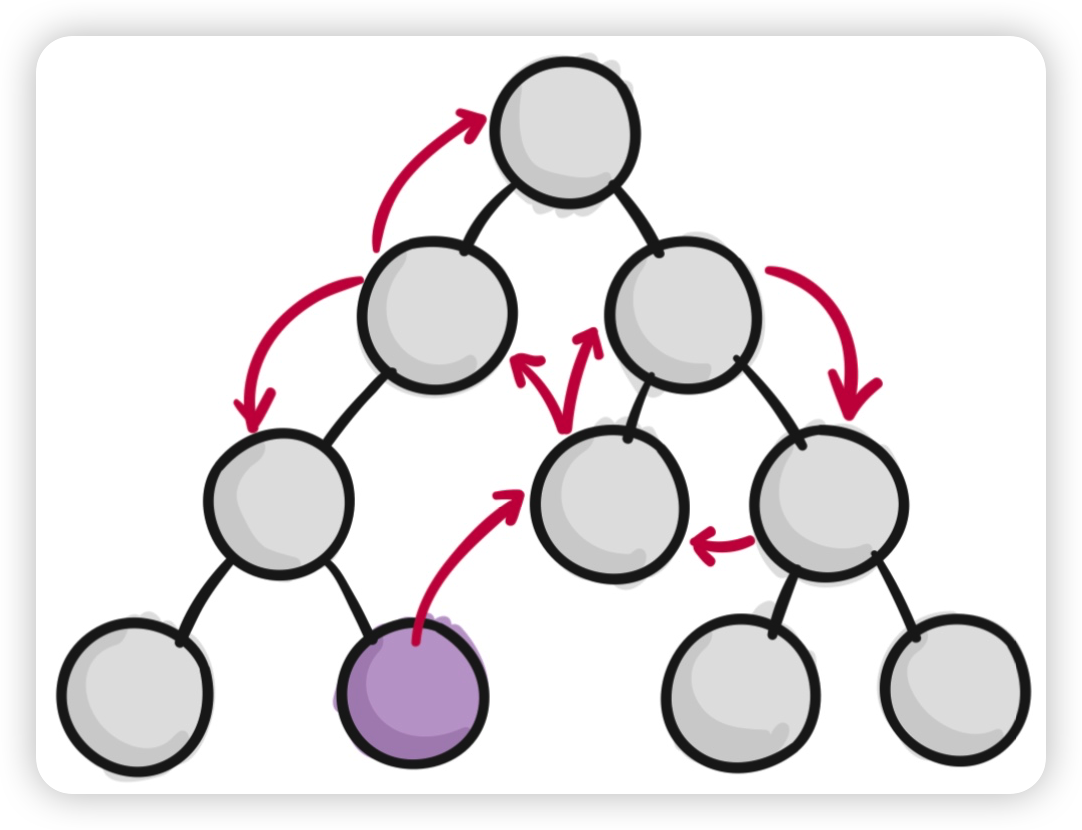
实际上这个就是我们使用状态管理库的目的,我们使用状态管理库,就是为了将组件的状态分离出来,这样可以方便我们维护,也方便组件之间进行状态的共享。
没有使用状态管理库:
使用状态管理库之后:
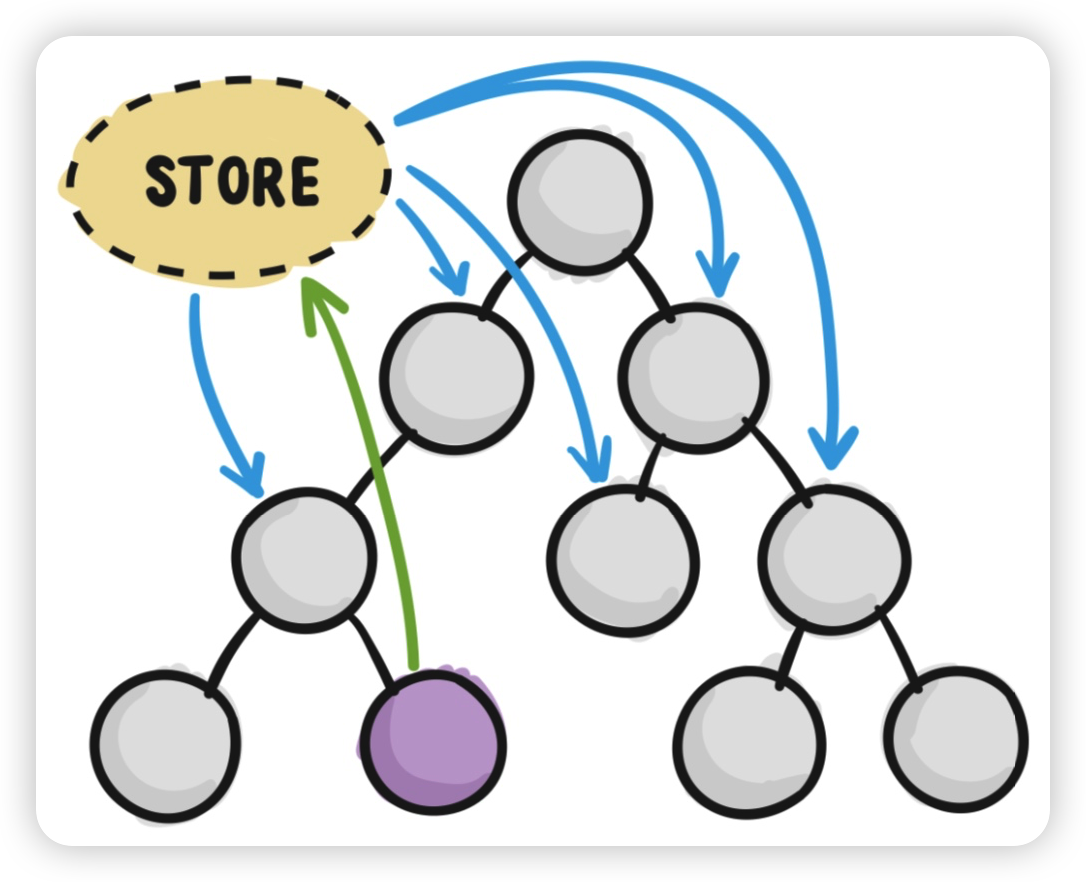
但是需要注意一点,并非所有的 Vue 应用都需要使用状态管理库,这个取决于我们所开发的应用的规模大小。如果只是小规模的 Vue 应用,使用状态管理库反而显得更麻烦。
4-1-2. 选择 Pinia 来进行状态管理
目前 Vue 官方已经推荐开发者使用 Pinia 来替代 Vuex 作为状态管理库,你可以将 Pinia 看作是 Vuex5.x
相比 Vuex,Pinia 真的真的真的很轻量,大小只有 1kb 左右,基本上可以忽略
当然相比之前的 Vuex,还有一些其他的优点:
https://pinia.vuejs.org/zh/introduction.html#comparison-with-vuex
另外如果你之前的项目使用的是 Vuex,那么你可以看一下官方的迁移指南:
https://pinia.vuejs.org/zh/cookbook/migration-vuex.html
4-1-3. 避免直接操作 store 的状态
虽然我们可以直接操作 store 的状态,但是在 Pinia 中我们最好还是避免直接操作 store 里面的状态,而是通过对应的 getters 来读取,actions 来修改
<!-- 计数器-->
<button class="btn" @click="num++">+</button>
// 待办事项
function addHandle() {
  if (newItem.value) {
    console.log(list.value.items);
    // 直接操作 store 的状态
    list.value.items.push({
      text : newItem.value,
      isCompleted: false,
    });
    newItem.value = "";
  } else {
    window.alert("请填写新增项目");
  }
}
与其对应的应该使用 getters 和 actions 等 API 来处理状态的读取和修改
<button class="btn" @click="increment">+</button>
function addHandle() {
  if (newItem.value) {
    addItem(newItem.value);
    newItem.value = "";
  } else {
    window.alert("请填写新增项目");
  }
}
这样做的好处在于提高了代码的可维护性,应该数据的改变始终来自于 actions 的方法,而不是分散于组件的各个部分。
4-1-4. 使用 TypeScript
Pinia 本身就是使用 typescript 编写的,因此我们在使用 pinia 的时候,能够非常方便的、非常自然的使用 typescript,使用 typescript 可以更好的提供类型检查和代码提示,让我们的代码更加可靠和易于维护。
官方文档对应:https://pinia.vuejs.org/zh/core-concepts/state.html#typescript
4-1-5. 将状态划分为多个模块
在一个大型应用中,如果将所有组件的状态放置在一个状态仓库中,那么会显得该状态仓库非常的臃肿。因此一般在大型项目中,是一定会将状态仓库进行拆分的。
在早期的 Vuex 中,就已经支持将状态仓库按照不同的功能模块进行拆分,只不过在 Vuex 时期,状态仓库拆分时按照的是嵌套的方式进行代码组织的。
在 Pinia 中,组织状态仓库的形式不再采用像 Vuex 一样的嵌套,而是采用的是扁平化的设计,每一个状态仓库都是独立的,这个其实也是 Pinia 这个名字的来源。
4-2. 补充内容
辅助函数
- mapStores
- mapActions
- ...
- https://pinia.vuejs.org/zh/core-concepts/state.html#resetting-the-state
- https://pinia.vuejs.org/zh/cookbook/options-api.html
// Vue2 的写法
import { mapState, mapActions } from "pinia";
import { useCartStore } from "../store/useCartStore.js";

export default {
  computed: {
    ...mapState(useCartStore, ["cartData", "totalPrice"]),
  },
  methods: {
    ...mapActions(useCartStore, ["increment", "decrement", "deleteItem"])
  }
};
订阅 state 以及 action
import { useCounterStore } from '../store/useCounterStore.js'; const store = useCounterStore(); //拿到仓库 // 监听 state 的变化 store.$subscribe((mutation, state)=>{ // mutation 是一个对象,记录了这一次变化的一些信息 console.log("type:::",mutation.type); console.log("storeId:::",mutation.storeId); console.log("payload:::",mutation.payload); console.log("state:::",state); // 做其他的事情... });import { useCounterStore } from '../store/useCounterStore.js'; const store = useCounterStore(); //拿到仓库 // 监听action // 传递给它的回调函数会在 action 本身之前执行 store.$onAction( ({ name, // action 名称 store, // store 实例,类似 `someStore` args, // 传递给 action 的参数数组 }) => { console.log("name:::", name); console.log("store:::", store); console.log("args:::", args); } );插件选项
- composition 模式下 第三个参数
- 官网介绍
真题解答
题目:在目前的 Vue 应用中,使用状态管理库进行状态管理时有哪些最佳实践?请列举一至两条
参考答案:
在使用 Vue 开发应用时,有关组件的状态管理这一块,有如下的最佳实践:
- 使用专门的状态仓库来管理组件状态,以达到状态逻辑和业务逻辑的分离
- 比起 Vuex,目前更推荐使用 Pinia 来管理仓库的状态
- 尽量都集中使用 actions 中的方法来操作 store 的状态,避免直接操作 store
- 使用 typescript 以便得到更好的类型提示
- 根据不同的功能模块来创建对应的独立的状态仓库
5. Pinia部分源码解析
养成阅读源码的习惯,有如下的好处:
- 阅读源码可以帮助我们扩宽自己的视野,可以看到优秀的程序员是如何书写代码的,从而提升我们自己的编码水平
- 知其然知其所以然。如果你阅读过源码,那么你自然能够知道某一个 API 是如何实现,背后的实现原理是什么,那么你也就能够自然的避免在使用该 API 时可能会遇到的一些 bug,会有一些自己独特的优化心得
- 最后一点就是阅读源码能够冲击大厂,大厂在面试的时候不会考察某个 API 如何使用,没什么意义,因为 API 经常也在变化,一般都是考察 API 背后的原理
阅读源码时的一些注意事项
- 阅读源码基于你已经使用过了该库或者该框架,对里面的 API 已经很熟悉了,是一种自发的行为
- 阅读源码一定要耐心
- 不要陷入于细节,在阅读源码的时候往往需要你站在一个更高的角度
5-1. defineStore 方法
回顾 defineStore 方法的使用。defineStore 方法支持两种变成风格,一种是 option store,另一种是 setup store
option store 风格:
export const useCounterStore = defineStore('counter', {
  state: () => ({ count: 0 }),
  getters: {
    double: (state) => state.count * 2,
  },
  actions: {
    increment() {
      this.count++
    },
  },
})
option store 风格可以将 id 写到选项里面:
export const useCounterStore = defineStore({
  id: 'counter',
  state: () => ({ count: 0 }),
  getters: {
    double: (state) => state.count * 2,
  },
  actions: {
    increment() {
      this.count++
    },
  },
})
setup store 风格:
export const useCounterStore = defineStore('counter', () => {
  const count = ref(0)
  function increment() {
    count.value++
  }

  return { count, increment }
})
defineStore 对应的源码如下:
function defineStore(
// TODO: add proper types from above
idOrOptions, setup, setupOptions) {
    let id;
    let options;
    // isSetupStore 会是一个布尔值,如果是 setup 函数,isSetupStore 为 true,否则为 false
    const isSetupStore = typeof setup === 'function';
    if (typeof idOrOptions === 'string') {
        // 如果进入此 if,说明 idOrOptions 是该仓库的 id
        // id 是 defineStore 函数内部的变量,存储仓库 id
        id = idOrOptions;
        // the option store setup will contain the actual options in this case
        // 如果是 setup 风格,就将第三个参数(如果有)赋值给 options,否则就将配置对象赋值给 options
        options = isSetupStore ? setupOptions : setup;
    }
    else {
        // idOrOptions 参数为配置对象
        options = idOrOptions;
        id = idOrOptions.id;
    }
    // 这个函数就是最终返回给外部的函数
    // 外部通过执行这个函数拿到 store 仓库
    function useStore(pinia, hot) {
        const currentInstance = getCurrentInstance();
        pinia =
            // in test mode, ignore the argument provided as we can always retrieve a
            // pinia instance with getActivePinia()
            (pinia) ||
                (currentInstance && inject(piniaSymbol, null));
        if (pinia)
            setActivePinia(pinia);
        if (!activePinia) {
            throw new Error(`[🍍]: getActivePinia was called with no active Pinia. Did you forget to install pinia?\n` +
                `\tconst pinia = createPinia()\n` +
                `\tapp.use(pinia)\n` +
                `This will fail in production.`);
        }
        pinia = activePinia;
        if (!pinia._s.has(id)) {
            // creating the store registers it in `pinia._s`
            // 创建一个仓库,并且将这个仓库注册到 pinia._s
            // 根据不同的风格开始创建仓库
            if (isSetupStore) {
                // 如果是 setup 风格,调用的是 createSetupStore
                createSetupStore(id, setup, options, pinia);
            }
            else {
                // 如果是 option 风格,调用的是 createOptionsStore
                // createOptionsStore 方法背后实际上也是在调用 createSetupStore,内部会创建一个名为 setup 的函数
                // 将选项转为 setup 函数内部的项目,然后调用 createSetupStore 方法,将 setup 函数作为第二个参数传递过去
                // 因此理论上来讲,setup 实践上要更加高效一些,因为 option store 背后也是转为 setup,这些是你不阅读源码无法知道的
                createOptionsStore(id, options, pinia);
            }
            /* istanbul ignore else */
            {
                // @ts-expect-error: not the right inferred type
                useStore._pinia = pinia;
            }
        }
        const store = pinia._s.get(id);
        if (hot) {
            const hotId = '__hot:' + id;
            const newStore = isSetupStore
                ? createSetupStore(hotId, setup, options, pinia, true)
                : createOptionsStore(hotId, assign({}, options), pinia, true);
            hot._hotUpdate(newStore);
            // cleanup the state properties and the store from the cache
            delete pinia.state.value[hotId];
            pinia._s.delete(hotId);
        }
        // save stores in instances to access them devtools
        if (IS_CLIENT &&
            currentInstance &&
            currentInstance.proxy &&
            // avoid adding stores that are just built for hot module replacement
            !hot) {
            const vm = currentInstance.proxy;
            const cache = '_pStores' in vm ? vm._pStores : (vm._pStores = {});
            cache[id] = store;
        }
        // StoreGeneric cannot be casted towards Store
        return store;
    }
    useStore.$id = id; // 在 useStore 函数上面还挂了一个 $id,存储了该仓库的 id
    return useStore; // 在向外部返回这个函数
}
5-2. storeToRefs 方法
首先我们还是回顾该方法的用法:
<script setup>
import { storeToRefs } from 'pinia'
const store = useCounterStore()
const { name, doubleCount } = storeToRefs(store)
const { increment } = store
</script>
源码如下:
function storeToRefs(store) {
    // See https://github.com/vuejs/pinia/issues/852
    // It's easier to just use toRefs() even if it includes more stuff
    // 针对 Vue2 版本的处理
    if (isVue2) {
        // @ts-expect-error: toRefs include methods and others
        return toRefs(store);
    }
    else {
        store = toRaw(store);
        // 创建了一个空对象
        const refs = {};
        // 遍历仓库对象
        for (const key in store) {
            // 拿到仓库对象对应的每一项的值
            const value = store[key];
            if (isRef(value) || isReactive(value)) {
                // @ts-expect-error: the key is state or getter
                // 如果这个值本身是响应式的,将这个值以原本的 key 添加到 refs 对象上面
                refs[key] =
                    // ---
                    toRef(store, key);
            }
        }
        // 整个 for 循环完了之后,所有响应式的值被添加到了 refs 对象上面
        // 向外部返回这个 refs 对象
        return refs;
    }
}